
AutoCodes Tech
AutoCodes.comAuto & Vehicles
4.15.00 Reviews
- Version
- 2.5.3
- Installs
- 10.00K
- Age Rating
- Everyone
Screenshots
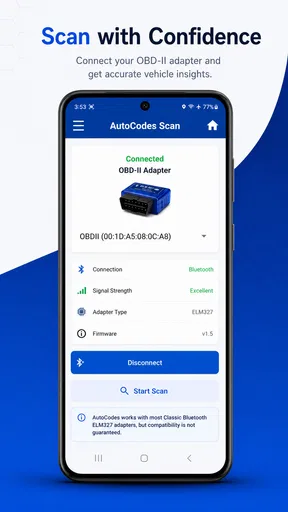
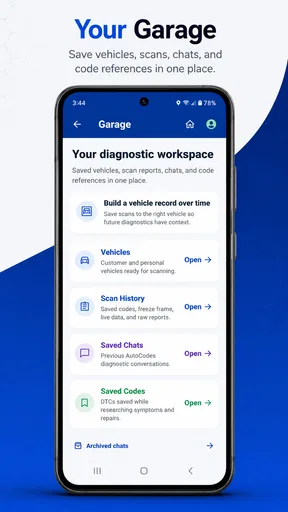
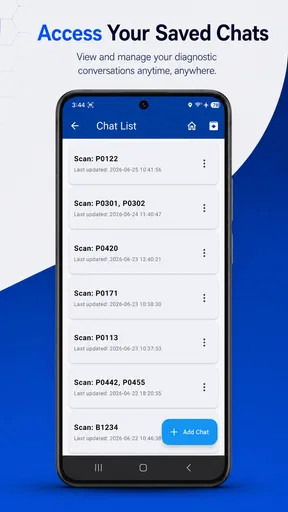
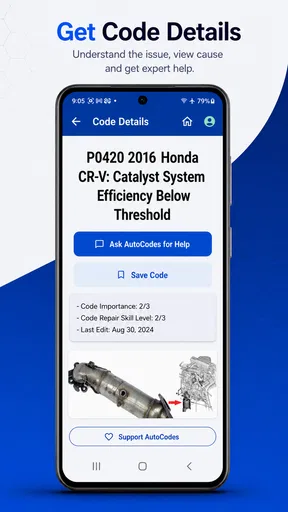
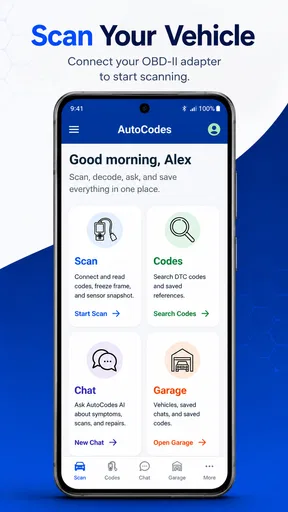
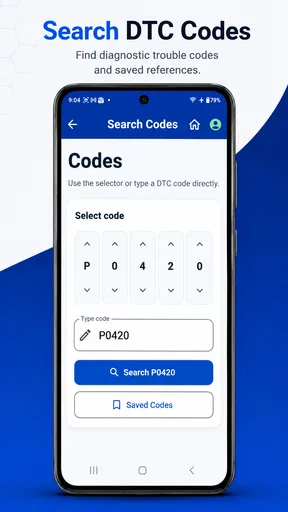
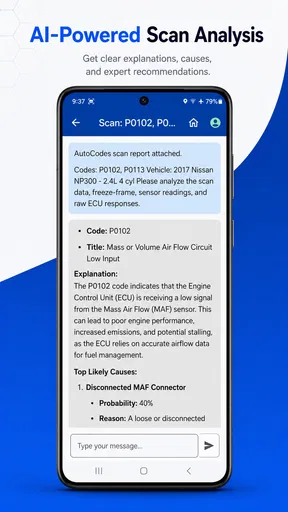
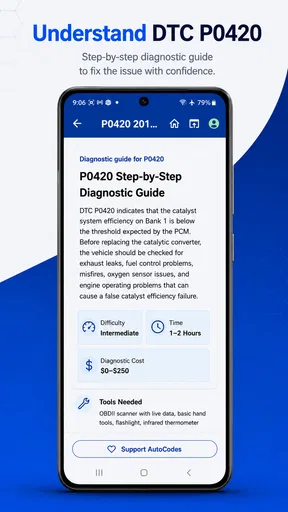
Our Review of AutoCodes Tech
 Analysis by Appyee
I approached AutoCodes Tech as the kind of tool I would keep on my phone for the moment a dashboard warning appears, rather than something I would open every day. Its purpose is practical: it combines an AI OBDII troubleshooting assistant with a chat-style tool aimed at mechanics and people who prefer to diagnose car problems themselves. That makes it more interesting than a simple code lookup app, but also raises an important question: does it remain useful once the initial curiosity wears off?
My short answer is that it can earn a place in a DIY driver’s toolkit, especially when it helps turn an unfamiliar diagnostic code into a sensible next step. I would not treat it as a replacement for a proper scan tool, a repair manual, or a qualified technician. I see it as a layer of interpretation between raw vehicle information and a repair decision.
AutoCodes Tech is a free Android app from AutoCodes.com in the Auto & Vehicles category. It is available to users rated Everyone, supports Android 7.0 and newer, and its current version is 2.5.3. The app has passed the early discovery stage with over ten thousand installs, while its average rating sits at 4.1 from around forty ratings and five written reviews. Those numbers suggest a small but interested user base rather than a universally established workshop standard.
What the first week feels like
The strongest first impression comes from the conversational approach. Traditional OBDII applications often present a code, a short definition, and perhaps a list of possible causes. That is useful when I already know what I am looking at, but it leaves a gap between “the car reported this” and “what should I check next?” A chat-based troubleshooter is designed to make that gap easier to cross by letting me ask follow-up questions in ordinary language.
That matters when the warning light appears before a planned trip. I might know that a code relates to an emissions system, but not whether it is sensible to inspect a loose connection, look for a damaged hose, or stop driving immediately. The useful habit is to give the app context instead of entering only the code: mention whether the vehicle drives normally, whether the light is steady or flashing, and whether any recent work was done. The more specific the question, the more useful the resulting discussion is likely to be.
During an initial session, I would use it in three passes. First, I would identify the code and record the exact wording. Second, I would ask for likely causes ranked by how easy and safe they are to inspect. Third, I would challenge the first answer by asking what symptoms would point toward a different cause. This is a better workflow than accepting the first plausible explanation, because diagnostic codes frequently identify a system or condition rather than a single failed part.
The most valuable early lesson is to use the app for narrowing possibilities, not authorizing expensive parts replacement. If a code could be caused by wiring, a sensor, a vacuum leak, or a mechanical issue, the right question is not “which part should I buy?” It is “what observation would separate these possibilities?” That shift can prevent the common DIY mistake of replacing the most visible component without testing the surrounding system.
The AI element also makes the app approachable for someone who finds workshop terminology intimidating. A new owner can ask what a code means, what symptoms are relevant, and which checks require tools. A more experienced user can use the same conversation to organize a diagnostic plan. The difference is that a beginner needs explanation, while a mechanic may want a concise sequence of checks. I would expect the quality of the experience to depend heavily on how clearly the user describes the vehicle and symptoms.
There is a practical limitation during the first week: a chat answer can sound confident even when the available information is incomplete. I would not assume that an articulate response has confirmed the fault. Before touching anything, I would verify the code, check the vehicle’s service information, and follow basic safety precautions. The app is most helpful when it improves my questions and prevents random guessing; it is less suitable when I want a guaranteed diagnosis from one warning light.
A realistic driveway scenario
Imagine a check-engine light appearing after refueling. The car still starts and drives, but the owner is unsure whether the problem is urgent. I would record the code, note that the symptom began immediately after filling the tank, and ask AutoCodes Tech to explain possible connections between the timing and the vehicle’s evaporative-emissions system. I would then ask which simple observations are worth making before buying anything, such as checking the fuel cap or looking for obvious damage.
That conversation could save time by directing attention toward relevant checks instead of unrelated engine components. It still would not prove the fuel cap is the cause, and it would not justify clearing the code repeatedly while ignoring a persistent problem. If the warning light were flashing, the engine were misfiring badly, or the vehicle felt unsafe, I would stop treating the app as the main decision-maker and seek professional help.
This is where the product’s first-week appeal is real but easy to misunderstand. It gives a user a more comfortable starting point than a bare code dictionary, yet its value comes from guided reasoning rather than magical certainty. The faster I learn that distinction, the more responsibly I can use it.
What remains useful from month to month
After the novelty of chatting with an AI fades, recurring value depends on whether the app becomes part of a repeatable maintenance routine. For me, that routine would begin whenever a fault code appears, but it would not end with the first answer. I would use the conversation to create a small record of symptoms, checks already completed, and questions to ask a repair shop if the issue needs escalation.
That record-keeping mindset is one of the more useful ways to get lasting value from a troubleshooting assistant. Before visiting a mechanic, I could summarize when the warning began, whether it returned after clearing, what driving conditions triggered it, and which basic inspections were completed. Even if the app does not repair the car, it can help me communicate more clearly and avoid forgetting important details under pressure.
It can also support ownership of an older vehicle where minor warnings appear at inconvenient times. A driver who regularly performs basic checks may use the app to understand whether a new code is related to a previous symptom or represents a separate issue. The key is to compare the advice with the vehicle’s history rather than treating every session as an isolated question.
For mechanics and experienced DIY users, the chat format may be most useful as a second opinion during the early diagnostic stage. I would not use it instead of wiring diagrams, manufacturer procedures, scan-data interpretation, or measured tests. I would use it to generate possible branches in the investigation: if the code is present but the expected symptom is missing, what alternative explanations deserve attention? That kind of prompt can expose an assumption I had overlooked.
There is also a trade-off between convenience and depth. A general AI conversation can explain a problem in accessible language, but it may not provide the vehicle-specific precision of factory service information. A dedicated repair database or manufacturer manual is usually the better option when I need connector locations, exact test values, torque specifications, or a verified repair procedure. AutoCodes Tech makes more sense before that stage, when I am trying to understand the problem and decide what information I need next.
The app’s free entry point helps with occasional use. I can see why a driver would install it for an emergency warning light without committing to a subscription-style tool. At the same time, in-app purchases range from $0.99 to $4.99 per item. That means I would pay attention to which parts of my workflow remain available without spending and whether a paid item genuinely saves time. For occasional owners, a small purchase may be reasonable; for a professional, repeated costs should be compared with established diagnostic resources.
Its audience size is still modest, so I would not assume that every unusual vehicle or obscure code has the same depth of coverage as a long-established repair platform. That does not make it useless. It simply means I would be more careful with rare faults, manufacturer-specific systems, and situations where a wrong assumption could cause damage.
How it compares with familiar alternatives
The usual alternative is a basic OBDII reader paired with a code database. That combination is often faster for looking up a familiar code and may be preferable when I want a short, stable reference without a conversation. AutoCodes Tech has an advantage when I need help framing the next question or translating technical language into a practical inspection plan.
A second alternative is a professional scan tool. That is the better choice for live data, system tests, module communication, and workshop-level diagnosis, depending on the tool and vehicle. An AI chat assistant cannot replace those capabilities. Its role is closer to an interpreter and planning aid, especially for users who have scan information but are unsure how to organize it.
A third alternative is searching forums and video tutorials. Those sources can contain valuable vehicle-specific experiences, but they also require sorting through conflicting advice and checking whether the same symptoms truly apply. AutoCodes Tech offers a more direct conversation, while forums may provide richer real-world detail for a particular model. I would use the app to form a clear question, then consult model-specific sources when the repair becomes serious or unusual.
Finally, a mechanic remains the right alternative when safety, drivability, or uncertainty is the main issue. The app may help me arrive better prepared, but it should not encourage me to take risks under a vehicle, interfere with fuel or electrical systems without proper knowledge, or continue driving through severe symptoms.
Maintenance burden and sources of fatigue
The maintenance burden is fairly low in the sense that this is not an app I need to manage constantly. It is more of an on-demand tool. The real upkeep is behavioral: I need to provide accurate context, keep the original code, distinguish symptoms from guesses, and avoid treating a previous conversation as a permanent diagnosis.
That can become tiring if every session starts from scratch. A user may have to restate the vehicle, engine, mileage, recent repairs, and warning-light behavior to receive useful guidance. I would keep a simple note on my phone with the vehicle identification details, recurring codes, recent parts replaced, and dates of symptoms. That small preparation makes each future conversation more efficient and reduces the chance of mixing up an old fault with a new one.
Another source of fatigue is the possibility of broad answers. When several causes are plausible, the app may present a list that still leaves the user with the hard work. This is not necessarily a flaw in the concept; diagnosis genuinely requires evidence. Still, a beginner could feel that the app has moved the uncertainty around rather than removed it. I would counter that by asking for a prioritized inspection order and requesting a clear explanation of what result would support or weaken each possibility.
Repeated use may also expose the limits of conversational troubleshooting. If I keep asking variations of the same question without adding new evidence, I should not expect a better conclusion. The right next step is usually to gather information: inspect a connector, check for a visible leak, compare symptoms when the engine is cold and warm, or obtain a more capable scan. The app works best as a guide to the next useful observation, not as a substitute for observation.
There is a safety-related burden too. Automotive advice has consequences that ordinary app recommendations do not. A misunderstanding can lead to damaged components, a stranded driver, or an unsafe vehicle. I would treat urgent warnings, braking and steering problems, fuel leaks, overheating, and severe engine behavior as reasons to stop experimenting. In those cases, the app may help explain terminology, but the correct long-term habit is escalation.
For professionals, fatigue may come from the opposite direction: the answers could be too explanatory or too general when the user already understands the system. A mechanic who needs exact manufacturer procedures will likely work faster with professional service information. The app is better suited to the front end of a diagnostic conversation, customer education, or a quick second perspective than to replacing a complete workshop information system.
Who should keep it installed
I think AutoCodes Tech is a good fit for a DIY owner who has basic mechanical curiosity, an OBDII reader, and a willingness to verify advice before acting. It is especially useful for someone who wants to understand a warning light well enough to decide whether to inspect, monitor, book a repair, or stop driving. It can also help a cautious beginner ask better questions without pretending to be an expert.
It is less suitable for someone seeking one-tap certainty, exact part recommendations, or a complete repair procedure for every vehicle. I would also skip relying on it as the main tool if I regularly diagnose advanced electrical faults, need live-data analysis, or work in a professional environment where manufacturer documentation is essential. In those cases, a proper scan tool and technical reference should come first.
The Everyone age rating makes it approachable for general car owners, but that should not be confused with every repair being appropriate for every user. The app may explain a task clearly while the task itself still requires tools, training, or a safe workspace. I would use its accessibility as a reason to learn, not as permission to attempt work beyond my ability.
Does it earn lasting space?
AutoCodes Tech earns a place on my phone when I view it as a diagnostic companion rather than a definitive mechanic. Its strongest long-term contribution is not the novelty of asking an AI about a code. It is the possibility of building a calmer, more methodical response to dashboard warnings: capture the evidence, ask focused questions, check simple causes first, and know when to move to a professional diagnosis.
The app’s free price makes that occasional value easy to test, while the optional in-app items deserve a little scrutiny before becoming part of a regular workflow. I would not pay simply because an answer sounds polished. I would consider paying only if the added access consistently improves the quality or speed of my troubleshooting.
My lasting verdict is positive but measured. For a DIY driver, AutoCodes Tech can be more helpful than a static code list because it encourages a back-and-forth explanation. For a professional mechanic, it may be a convenient brainstorming or communication aid, but it does not replace specialized equipment and service documentation. Its recurring value comes from disciplined use, not constant use.
If I kept it installed, I would pair it with three habits: save the exact code and symptoms, ask what evidence would distinguish competing causes, and verify important advice through vehicle-specific documentation or a qualified technician. Used that way, AutoCodes Tech is a practical first step between a confusing warning light and a sensible repair decision. That is enough to justify space on my phone, provided I remember where its role ends.
Verdict
Strengths of AutoCodes Tech
- Quickly generates and manages codes from one convenient mobile interface.
- Useful for technicians who need reference codes while working remotely.
- Simple layout makes key tools easy to find and use.
- Can reduce time spent searching through manuals or online resources.
- Practical companion for users familiar with automotive or technical systems.
Limitations of AutoCodes Tech
- Its usefulness depends heavily on the specific codes and systems it supports.
- Some entries may require verification against official manufacturer information.
- The interface may feel too specialized for casual or first-time users.
- Limited value if you only need codes for an uncommon vehicle or device.
- An internet connection may be needed for updates or certain app features.
Similar Picks in This Category
View All
Android Auto
Google LLC4.1

maxim — order a taxi & food
PT. SITO4.7

Штрафы ГИБДД: проверка с фото
Pays LLC – Штрафы ГИБДД4.7

Номерограм – проверка авто
Авто Ассист4.8

Дром Авто
Дром4.9

Frequently Asked Questions
What is AutoCodes Tech and what can I use it for?
AutoCodes Tech is an automotive-focused application designed to help users access vehicle-related information and useful technical resources from a mobile device. Depending on the supported features and database, it may assist with identifying diagnostic trouble codes, understanding possible causes, and finding practical guidance. It is best viewed as a reference tool for drivers, technicians, and car enthusiasts rather than a complete replacement for professional diagnostic equipment.
Is AutoCodes Tech compatible with every vehicle and diagnostic code?
Compatibility can vary depending on the vehicle manufacturer, model year, engine, region, and the type of diagnostic information included in the app. AutoCodes Tech may cover a broad selection of common automotive codes, but users should not assume that every vehicle or manufacturer-specific code is supported. Before relying on a result, check the exact code, vehicle details, and any limitations listed in the app or its store description.
Can AutoCodes Tech diagnose and repair my car automatically?
No. AutoCodes Tech should not be considered an automatic repair solution. It can provide explanations, possible causes, and troubleshooting suggestions, but it cannot physically inspect components or confirm that a particular part has failed. Accurate diagnosis may require an OBD scanner, additional testing, service documentation, or a qualified mechanic. Always use the app’s information as guidance and verify important conclusions before replacing parts.
Does AutoCodes Tech require an internet connection or additional hardware?
The connection and hardware requirements depend on the specific features offered in the installed version. Browsing stored code information may work without continuous internet access, while searches, updates, advertisements, or online content may require a connection. The app itself may not function as an OBD scanner unless it explicitly supports compatible adapters. Review the permissions, device requirements, and accessory information before downloading or purchasing anything.
Is AutoCodes Tech suitable for beginners, and is it safe to follow its advice?
AutoCodes Tech can be useful for beginners because it may explain technical codes in simpler language and provide a starting point for investigating a warning light. However, automotive repairs involve electrical systems, moving parts, fuel, heat, and safety-critical components. Beginners should avoid risky procedures and should not rely on a single code as definitive proof of a failure. For braking, steering, airbags, or engine safety issues, consult a professional technician.
